
Models and Mobility Data
model.RmdThis page brings together the mobility datasets and fitted models
available in nomad. If you have a particular country in
mind, you can start by finding its datasets in the first table, then use
the map to explore their coverage. The model table and diagnostic plots
further down the page show which models were fit to those data and how
well they reproduced the observed flows.
You can browse everything here without running any code. Each section also has an expandable code panel if you would like to make the same tables or plots in R, for example to restrict a comparison to the datasets relevant to your analysis.
Mobility Data
The first table describes the source data. Alongside the country, it helps to look at the spatial scale and collection dates, since these determine which movements a model has been fit to explain. For example, movement between large administrative areas may provide little information about short journeys within a town. Expanding a row gives more detail on how the data were sampled and whether flows below a reporting threshold were suppressed. Both can affect the observed pattern of movement.
To find a dataset, type its name or country code in the search box, or click a column heading to sort the table. The fitted-models column distinguishes entries we can already use for prediction from datasets for which we currently hold only metadata. Those entries remain in the table so that the catalogue also records data that may become available later.
Show how to browse mobility datasets in R
datasets <- mobility_table()
reactable::reactable(
  datasets[, c("name", "country", "type", "n", "aggregation", "date_start",
                "date_end", "has_fitted_models")],
  searchable = TRUE, resizable = TRUE, wrap = FALSE,
  bordered = TRUE, highlight = TRUE,
  showPageSizeOptions = TRUE, pageSizeOptions = c(4, 8, 12, 24), defaultPageSize = 8,
  defaultSorted = list(date_start = "desc"),
  defaultColDef = reactable::colDef(minWidth = 100),
  theme = reactable::reactableTheme(highlightColor = "#eaf4f8"),
  columns = list(
    name = reactable::colDef(name = "Dataset", sticky = "left", minWidth = 175,
                             style = list(borderRight = "1px solid #ccd5da")),
    country = reactable::colDef(name = "ISO3", minWidth = 65),
    type = reactable::colDef(name = "Data", minWidth = 130),
    n = reactable::colDef(name = "Records", minWidth = 140, format = reactable::colFormat(digits = 0, separators = TRUE)),
    aggregation = reactable::colDef(name = "Spatial scale"),
    date_start = reactable::colDef(name = "Start"),
    date_end = reactable::colDef(name = "End"),
    has_fitted_models = reactable::colDef(name = "Fitted models", minWidth = 140,
                                          cell = function(x) if (x) "Yes" else "Not yet")
  ),
  details = function(index) {
    row <- datasets[index, ]
    period <- if (is.na(row$prediction_period_days)) "Unknown" else
      paste(row$prediction_period_days, "days")
    htmltools::tags$div(style = "padding: 12px; white-space: normal;",
      htmltools::tags$p(htmltools::tags$b("Sampling: "), row$sampling_scheme),
      htmltools::tags$p(htmltools::tags$b("Censoring: "),
                        if (is.na(row$censoring)) "Not specified" else row$censoring),
      htmltools::tags$p(htmltools::tags$b("Prediction period: "), period),
      if (!is.na(row$publication)) htmltools::tags$a("Publication", href = row$publication)
    )
  }
)
The start and end dates refer to the collection window. They do not necessarily tell us the period represented by a predicted trip count, particularly when the matrix used for fitting is an average of repeated observations. You can see the prediction period by expanding the dataset’s row. Predictions from the newer Facebook models represent trip counts over 21 days.
The catalogue can also include shared data and models whose source metadata are incomplete. The Zambia Facebook and CDR models from 2020 are examples for which the prediction period is unavailable. Keeping these models accessible allows us to explore their movement patterns, but the missing period limits their use for predicting trip totals over a particular duration. An unknown entry in the table is therefore a reason to consider what information your analysis requires.
Where are the data from?
The map gives an overview of where the catalogued data come from. Use the buttons in the top right to switch between Facebook and call data records, then click a country to see its dataset details. Where several datasets cover the same country and source, the map displays the most recent one. You can find the others in the table above.
Darker shading indicates a larger number of records. This helps show the scale of each dataset, although it should not be interpreted as a direct comparison of travel rates because the sampling methods, record definitions and collection periods differ. For the newer Facebook datasets, the source-region selector also adds the administrative centroids used in the model inputs. This lets you look more closely at the spatial scale represented by a particular dataset.
Show how to make the coverage map in R
world <- rnaturalearth::ne_countries(scale = "medium", type = "map_units",
                                       returnclass = "sf")
locations <- readRDS(system.file("extdata", "source_locations.rds", package = "nomad"))
map_data <- datasets[order(datasets$date_end, decreasing = TRUE, na.last = TRUE), ]
map_data <- map_data[!duplicated(paste(map_data$country, map_data$type)), ]
world$country <- world$iso_a3
world$country[world$country == "-99"] <- world$adm0_a3[world$country == "-99"]
coverage <- merge(world[, c("country", "name_long")], map_data, by = "country")
coverage$log_records <- log10(coverage$n)
coverage$popup <- paste0(
  "<b>", coverage$name_long, "</b><br>", coverage$name,
  "<br>", coverage$date_start, " to ", coverage$date_end,
  "<br>Records: ", format(round(coverage$n), big.mark = ",", scientific = FALSE, trim = TRUE),
  "<br>Spatial scale: ", coverage$aggregation,
  "<br>Fitted models: ", ifelse(coverage$has_fitted_models, "available", "not yet available")
)
palette <- leaflet::colorBin("YlOrBr", domain = coverage$log_records, bins = 5)
map <- leaflet::leaflet(coverage, width = "100%", height = 550)
map <- leaflet::addMapPane(map, "land", zIndex = 200)
map <- leaflet::addPolygons(map, data = world,
  color = "#bdc8cc", weight = 0.5, fillColor = "#f7f7f2", fillOpacity = 1,
  options = leaflet::pathOptions(pane = "land", interactive = FALSE,
    attribution = 'Boundaries: <a href="https://www.naturalearthdata.com/">Natural Earth</a>'))
for (source in c("facebook", "call data record")) {
  layer <- coverage[coverage$type == source, ]
  group <- if (source == "facebook") "Facebook" else "Call data records"
  map <- leaflet::addPolygons(map, data = layer, group = group,
    fillColor = ~palette(log_records), fillOpacity = 0.75,
    color = "#8c949b", weight = 1, popup = ~popup, label = ~name_long,
    highlightOptions = leaflet::highlightOptions(weight = 3, color = "#2c3e50",
                                                  bringToFront = TRUE))
}
map <- leaflet::addLayersControl(map, baseGroups = c("Facebook", "Call data records"),
                                 options = leaflet::layersControlOptions(collapsed = FALSE))
map <- leaflet::hideGroup(map, "Call data records")
map <- leaflet::addLegend(map, pal = palette, values = ~log_records,
                          title = "Records (log10)", position = "bottomleft")
ids <- sort(unique(locations$data_name))
for (id in ids) {
  points <- locations[locations$data_name == id, ]
  map <- leaflet::addCircleMarkers(map, data = points, lng = ~lon, lat = ~lat,
    radius = 3, color = "#2166ac", fillOpacity = 0.85, group = id,
    popup = ~htmltools::htmlEscape(label))
}
map <- leaflet::hideGroup(map, ids)
map <- leaflet::fitBounds(map, lng1 = -26, lat1 = -36, lng2 = 63, lat2 = 39)
htmlwidgets::onRender(map, '
function(el, x, ids) {
  var map = this;
  var control = L.control({position: "topright"});
  control.onAdd = function() {
    var label = L.DomUtil.create("label");
    label.style.cssText = "background: white; padding: 8px; border-radius: 4px";
    label.textContent = "Source regions: ";
    var select = document.createElement("select");
    select.setAttribute("aria-label", "Source dataset");
    var none = document.createElement("option");
    none.value = ""; none.textContent = "Country coverage";
    select.appendChild(none);
    ids.forEach(function(id) {
      var option = document.createElement("option");
      option.value = id; option.textContent = id;
      select.appendChild(option);
    });
    select.onchange = function() {
      ids.forEach(function(id) {
        var group = map.layerManager.getLayerGroup(id);
        if (group) map.removeLayer(group);
      });
      var selected = map.layerManager.getLayerGroup(select.value);
      if (selected && select.value) {
        map.addLayer(selected);
        map.fitBounds(L.featureGroup(selected.getLayers()).getBounds());
      } else {
        map.fitBounds([[-36, -26], [39, 63]]);
      }
    };
    label.appendChild(select);
    L.DomEvent.disableClickPropagation(label);
    L.DomEvent.disableScrollPropagation(label);
    return label;
  };
  control.addTo(map);
}', data = ids)
Model Performance
Once you have identified a source dataset, use its name to find the corresponding fits in the model table. You can also filter the columns by country, model family or type. Clicking a fit statistic sorts the table, which is useful for comparing models fit to the same observations.
The error measures need to be interpreted in relation to those observations. A small RMSE for a dataset with relatively few trips does not demonstrate a better model than a larger RMSE for a dataset with much higher counts. It is therefore helpful to narrow the table to one dataset before comparing fit errors, and then inspect the plots below to understand which flows each model misses. Some statistics were not supplied for every fit. In particular, missing values for the deviance information criterion (DIC) mean that those models cannot be included when calculating weights from that statistic.
Show how to compare fitted models in R
models <- model_table()
reactable::reactable(
  models[, c("name", "country", "mobility_model", "model_type", "RMSE", "MAPE",
              "R2", "DIC", "max_rhat", "supports_newdata")],
  searchable = TRUE, filterable = TRUE, resizable = TRUE, wrap = FALSE,
  bordered = TRUE, highlight = TRUE,
  defaultSorted = list(R2 = "desc"),
  showPageSizeOptions = TRUE, pageSizeOptions = c(4, 8, 12, 24), defaultPageSize = 8,
  theme = reactable::reactableTheme(highlightColor = "#eaf4f8"),
  defaultColDef = reactable::colDef(minWidth = 90),
  columns = list(
    name = reactable::colDef(name = "Model", sticky = "left", minWidth = 260,
                             style = list(borderRight = "1px solid #ccd5da")),
    country = reactable::colDef(name = "ISO3", minWidth = 65),
    mobility_model = reactable::colDef(name = "Family", minWidth = 150),
    model_type = reactable::colDef(name = "Type", minWidth = 120),
    RMSE = reactable::colDef(format = reactable::colFormat(digits = 1, separators = TRUE)),
    MAPE = reactable::colDef(format = reactable::colFormat(digits = 2)),
    R2 = reactable::colDef(format = reactable::colFormat(digits = 3)),
    DIC = reactable::colDef(format = reactable::colFormat(digits = 0, separators = TRUE)),
    max_rhat = reactable::colDef(name = "Max R-hat"),
    supports_newdata = reactable::colDef(name = "New regions", minWidth = 100)
  )
)
The maximum R-hat column summarises a different aspect of the fit.
R-hat compares variation within and between sampling chains, so a high
value suggests that the chains have not adequately explored the same
parameter distribution. Those fits need further convergence review
before relying on their parameter estimates. A value close to one is
encouraging, but you should also inspect the parameter-level summaries
available through summary(model) and consider whether the
source data suit your application.
The final column indicates whether a model can predict for new regions. Basic and finite radiation models are restricted to their original regions and populations, even when their stored fit statistics look favourable. Other model families can be applied to new inputs, with checks and warnings described in the model selection vignette.
Model Fit Checks
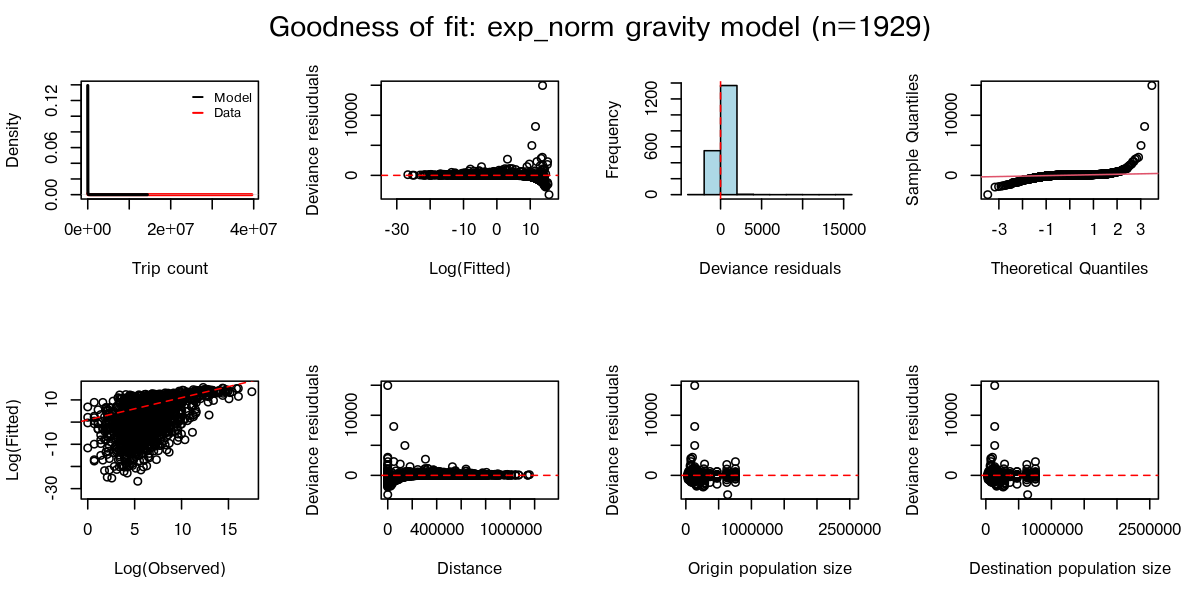
Choose a model from the dropdown to inspect its saved diagnostic plot. The first panel compares observed and predicted flows, while the residual panel shows the differences between them. For example, a model may reproduce the largest flows reasonably well but consistently miss smaller ones. Such a pattern can matter for an analysis of how infection reaches less connected regions, even when the overall error appears small.
These plots describe agreement with the data used to fit each model. They help us understand that fit, but do not tell us how well it will predict movement in a different place or period. The code below the plot shows how to retrieve the same checks and parameter summaries for a selected model in R.
Show how to inspect the same fit in R
Continue to Selecting a mobility model for a worked comparison of predictions, uncertainty and ensembles.